Fuzzing Python - pyfuzz
Background
"Python programs shouldn't crash" - Someone, somewhere, probably
Generally speaking, it should be impossible to crash the Python interpreter by making it evaluate an input as python.
There are a few documented exceptions where a crash is accepted:
- Using the ctypes module to call into C code that crashes, or to do stuff with pointers etc.
- Manually triggering an os-level signal that kills the process (e.g. SIGKILL, SIGSEGV, etc.)
- The kernel being unable to allocate stack space within the allowed stack size (purely running out of stack space should not crash the interpreter, but if the kernel can't actually lazily allocate the pages required to hold the stack data, then there's not much that can be done about it!)
- Setting the recursion limit really high, and then calling recursive code
- Some random functions that are known issues:
curses.window.derwin()with large coordinates, for example
Outside of this, if the interpreter crashes, then that's almost always a bug.
A while ago, I tried some simple fuzzing of Python inputs and quickly found a couple of serious bugs. Coincidentally, these had only just been introduced as part of the brand-new, unreleased, PEG parser: bpo-40904, bpo-40903.
I figured that using Claude to help, I could have another go at fuzzing Python again, in a more rigorous way, and see what might be found.
The Tool: pyfuzz
pyfuzz is a home-grown framework for fuzzing Python. It's not really intended for general use (but feel free!). It's quite good at testing Python against a lot of tricky inputs, and helping with analyzing the results.
The Runner
One thing with fuzzing, especially a complex language like Python, is it's very easy to run code that does surprising and potentially dangerous things. Calling os.unlink or os.kill or any of a range of functions can cause all sorts of issues. So it's important to fuzz in a sandbox that is self-contained and can be thrown away without causing wider issues.
I started just using Docker, but was running into various issues around handling memory exhaustion, core dumps, concurrency problems, and random errors. So I switched to a small shim based on the macOS hypervisor kit: pfrun.
Pfrun is a tiny command line Swift/Xcode project that does the bare minimum to run a Linux VM using the Swift Virtualization framework.
I wanted VM startup to be fast and efficient, and to be able to define the image contents precisely. Virtualization Framework has some unique requirements around loading ramdisks/kernels etc. I have some scripts that build a super minimal Arch based Linux image with a custom kernel. This kernel has been tuned to only include the bare minimum of features, for example, networking (beyond pipes) is not built at all, making it incredibly hard for the fuzzed Python to interact with the internet.
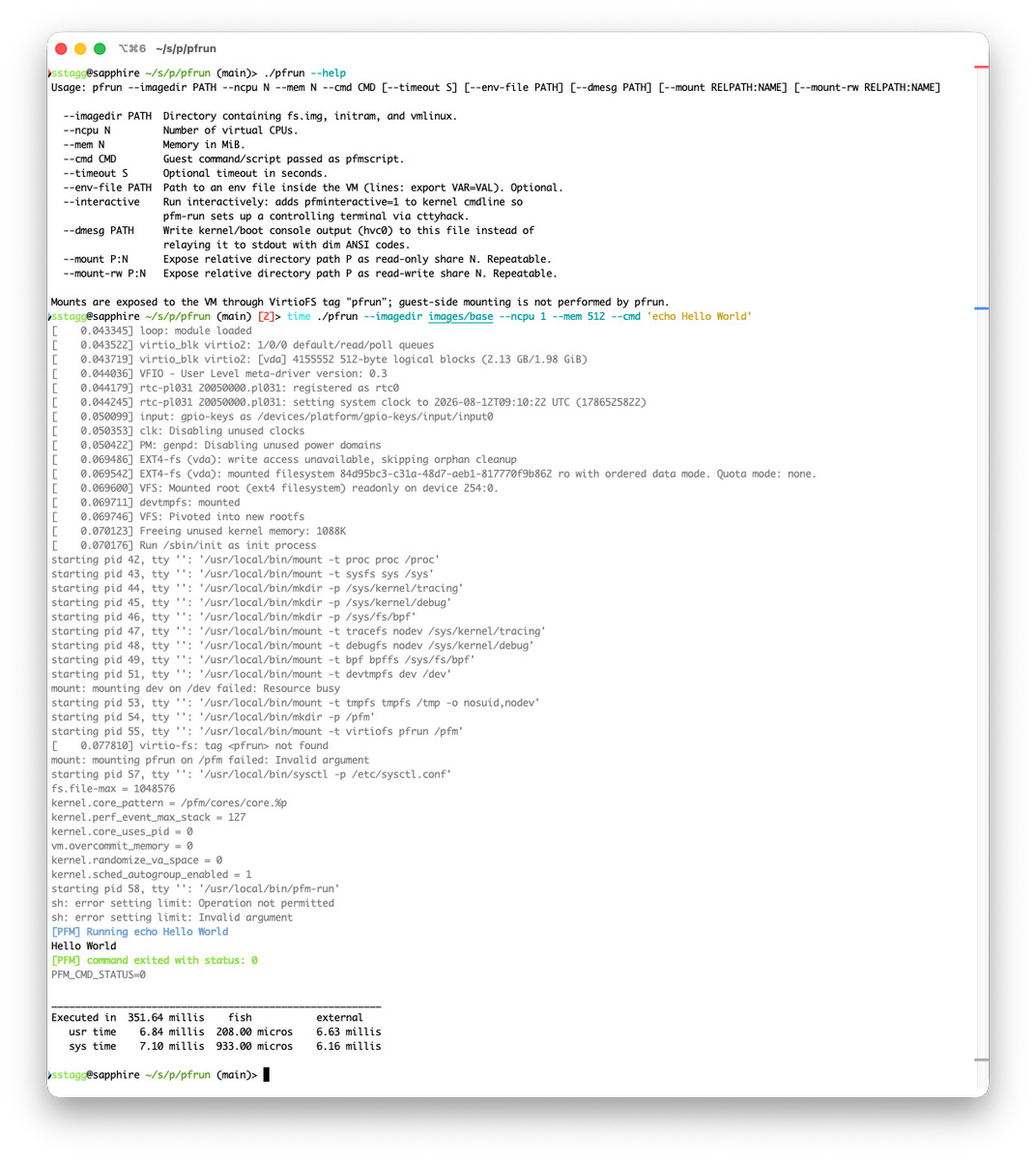
Everything inside the VM is read-only, except for any read-write external mounts, and /tmp.
The Fuzzer
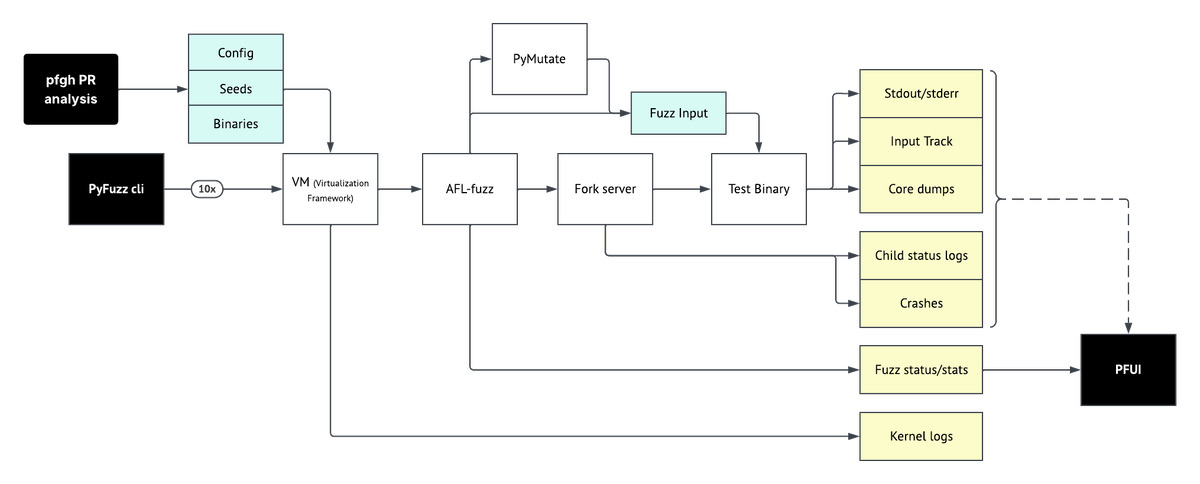
I used AFL++ as the fuzzing toolkit. It's a great project, has tons of features, and the developers are very responsive with any issues. The main issue I had was that AFL++ directly instruments binaries at compile time with a gcc/clang wrapper. It also does not like programs that use dlopen, and instrumenting dlopened libraries is a bit fiddly. (With Python, much of the complexity is in the standard library, and the C modules are dlopened, so solving this was important.)
To solve the dlopen issue, I created a clang wrapper script that inspects the command line being invoked. It uses pattern matching and a set of rules to parse and track all of the required ID offsets for each library
It also collects up dict files, so we can supply identifier dictionaries to the fuzzer that cover all of the compiled libraries.
AFL++ is provided with the instrumented libraries, a dictionary file from Python/the libs, and a Python test harness that uses the public Python API to evaluate each input in fast mode.
The Custom Mutator
AFL++ supports custom mutators. Mutators are basically functions that take a fuzz input, and edit it somehow. Obviously those functions have to be wrapped into a loadable shared library and output some metadata to help AFL use them properly.
The default built-in fuzzer mutators are optimized to fuzz simple single-purpose tools, typically on binary data.
Python, being a complex language, is not very efficient to fuzz in this way. The mutators end up spending a lot of time trying inputs that do not meaningfully alter the outcome, or don't explore more interesting/complex call patterns. I decided that a custom mutator would help here, allowing us to generate valid/targeted Python mutations much more efficiently.
Thankfully, AFL++ has just released experimental support for Rust based mutators, which is /great/ because the ruff linter project has a fast, robust, accurate Python parser written in Rust. So I added a custom mutator:
I used the parser to turn the input into Python AST (as much as possible given dodgy inputs) and then apply one of a set of mutations to it. As of writing, the sub-mutators are:
Sub-mutators
| Name | Description | Example |
|---|---|---|
| arg_spray | Adds a random argument to the end of any argument list | f() → f(len), or g(1) → g(1, 2) |
| attr_wrap | Find Name references, and insert an attribute lookup. Sometimes the attribute is then called. | x → x.__dict__ |
| bignum | Find numeric literals, and replace them with really large positive or negative alternatives | 1 → 1000**10000000 |
| del_insert | Find a variable assignment, add a del <name> after it |
x = 1 → x = 1; del x |
| line_dup | Pick a line OR top-level statement and repeat it | x = 1 → x = 1; x = 1 |
| name_subst | Find a Name reference, and replace it with a name randomly chosen from the identifiers dict file | a.b → class.b |
| operator_swap | Find a unary or binary operator, and replace it with a different compatible one | x + 0 → x // 1 |
| self_rebind | Find name references, and add a <name> = <name> assignment afterwards, to help detect refcount issues |
a = foo() → a = foo(); a = a |
| splat_spray | Find Container definitions (List/Tuple etc.) and add a *[1] or **{'x': 1} to the end, OR just add */** before any node |
x = [1] → x = [1, *[1]] OR for i in x: → for **i in x: |
| trickydata | Loads a corpus of 'tricky' floats/ints/strings and replaces literal values with a tricky value of the same type | prompt = "hello" → prompt = " لُلُصّبُلُلصّبُررً ॣ ॣh ॣ ॣ\n冗" |
| type_swap | Find literal value nodes, and replace them with literal values of a different type | print(1) → print(bytearray(1024)) |
With this, the following input:
import json

a = json.dumps({"a": 1, "b": 2})
After one mutation becomes (each generation actually produces multiple parallel mutations, but this example is):
import json

a @= json.dumps({"a": 1, "b": 2})
and after 10 sequential mutations:
import json

a &= json.dumps({'https://example%2Ecom/': *1, 'https://example.com/marker%': 2}, ((str.super()).hasattr))
del a
after 100 mutations:
import json
import json

del __subclasses__.RecursionError
(*a.*RecursionError) &= (json.__hash__).bool({'https://example。com/path': *(-((2**(9223372036854775807)))), '"john doe"@example.com': (-(==(+((0.0)**((((((-2147483648))**99999999))))))**99999999))}, ((((((str.len).chr).divmod).__qualname__).__doc__(((issubclass.TypeError).__builtins__((iter.__weakref__()))), sum, ((format.__exit__).__weakref__()))).complex), (KeyboardInterrupt.__delattr__()), (__subclasses__.__closure__()), (*exec.*((__del__.map).hasattr())()))
__subclasses__ = __subclasses__
(*a.inRecursionError) &= (json.__hash__).bool({'https://example。com/path': *(-(2147483648)), '"john doe"@example.com': (-(*(+(((0x7fffffff))+(((2049)))))**0.0))}, ((**((((str.len).id).divmod).__qualname__).__doc__((issubclass.__builtins__(iter)), sum, format, __delete__)).complex), (KeyboardInterrupt.__delattr__(__delete__, __next__, sorted)), (__subclasses__.__closure__(...)), (exec.len))
__delete__ = __delete__
del __delete__
del (a.__next__((hasattr.ord()))).map
del (*a.filter)
del (*a.IndexError)
Note: When actually fuzzing, this mutator is combined with the other mutators, so the extreme example above isn't really something that's likely, as AFL is good at picking promising candidates at each turn.
Seeds
AFL++ requires a set of seed inputs to start fuzzing from. Now, the input domain for Python is massive! so I decided to limit my focus to areas of the Python codebase that had recently been changed. To help with this, I have a bunch of scripts that:
- Query GitHub for recently merged CPython PRs
- Get their summary and the diff
- Get OpenAI to classify each PR with a risk score
- Pick the 10 highest scoring/most recent PRs that haven't been used yet
- Get OpenAI to generate a set of seed inputs based on the diffs/content of the PRs
- Add those seed inputs to the fuzzing corpus
This way, we're targetting areas of the codebase that are either known to have bugs (hence the PR), or are new code that won't have been tested as much as the rest of the codebase.
Analysis
Typically with fuzzing, you're looking for:
input -> causes unexpected behavior -> crash
The problem with Python being so mature is that this sort of direct crash is quite rare. Instead, it's common for one input to alter some state, or cause some memory pressure, and then another input to trip over the condition that then causes the crash.
Also, a large number of issues were exposed during out-of-memory conditions which could impact the ability to reproduce or debug issues.
To get around this, I set up fuzzing to capture as much data as possible, keeping in mind that often fuzz runs tried 100s of millions or even billions of inputs, so some consideration was taken to limit disk usage/file count.
Most of the time, an image that included LLDB and repeating the input was enough to work out what was going on, but for the more complex cases, I had to work out what sequence of inputs triggered the crash.
The fuzz harness writes input tracks files, which are just an efficient list of the inputs that each child process ran, in order. Each child process runs up to 1,000 inputs, so if a crash happens, you typically have several hundred inputs that could contribute to the result.
Firstly, we reconstruct a Python script that runs each input from the compressed track file, and verify that the crash is reproducible with all inputs. Then I have a script that uses a binary search to find the minimal set of inputs that reproduce the crash, including some intermediate cleanups that are performed by the harness.
Finally, the minimal set of inputs is then further reduced by removing things like try:/except: and exec() wrappers etc.. until a truly minimal input is found.
At this point, lldb can be used to work out the issue.
Writeups
It's not really fair to just dump a crash/bug report on open source developers without including as much useful context as possible.
In my case, I had the source code, debug builds, a debugger, and a full reproducible input, so there was no excuse for sketchy bug reports.
This often turned out to be a lot of work, especially for cases where the crash was caused by things like unbalanced refcounts, or missed exception checks popping up in other places.
My target standard for the report was to point out the exact line of code that was the root cause of the problem (not often the line that caused the crash!), and to explain exactly why, in plain English, the set of steps that caused the issue, ideally linking to source code lines at each step.
At one point, it was suggested that I just fix the issues with PRs, which I did start to do, but after the time spent isolating the issue, the natural overheads of submitting PRs did add quite an additional burden.
Bisect
For a long time, my VMs were based on alpine images to keep them small and lightweight, but the issue was that alpine uses Musl lib-c and this led to some crashes that were entirely caused by musl, and working that out was quite time consuming. So I switched to using an Arch base, with glibc. Even still, this environment was not exactly a standard one, so I had a separate process for generating a report-ready bisect.
The bisect sub-command uses a Ubuntu Docker image, and a nearly-automated script to identify the triggering commit as painlessly as possible.
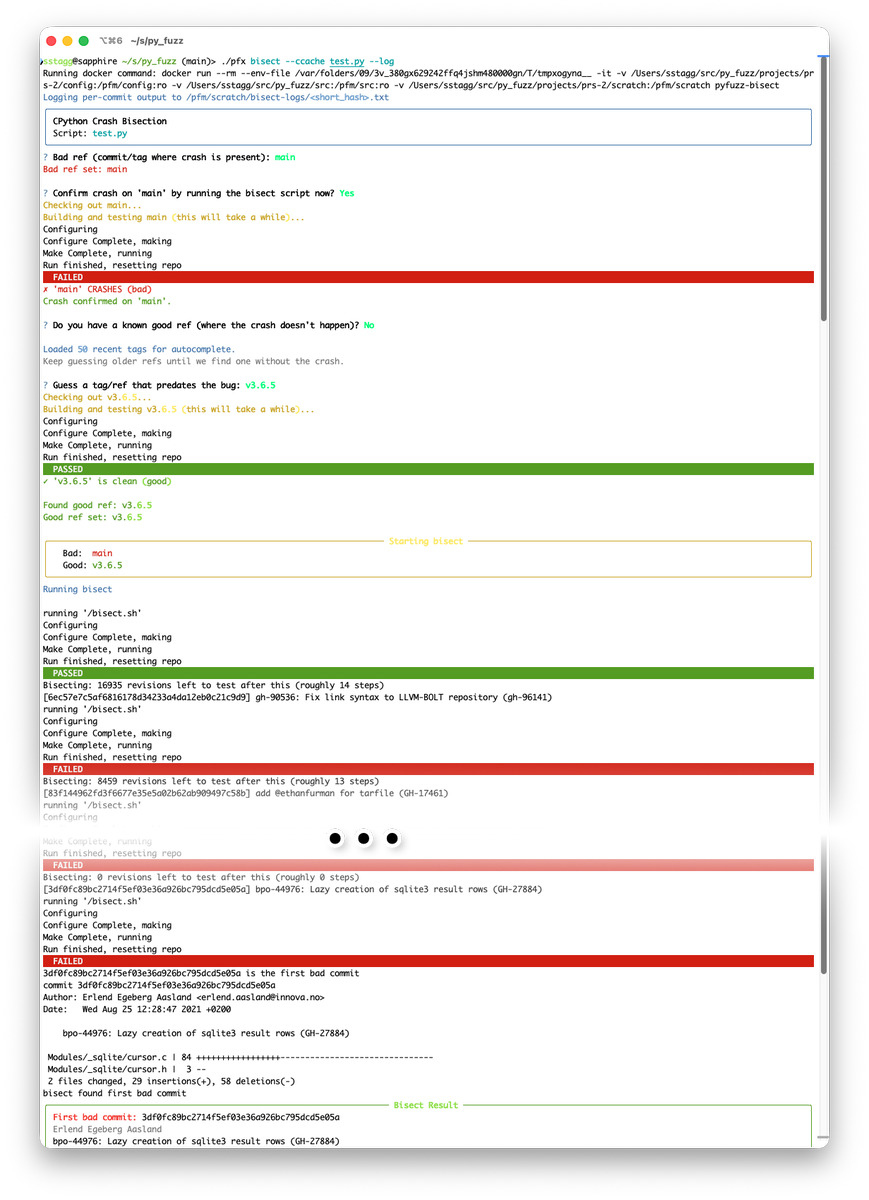
Note: The Python build process generates some files dynamically. Sometimes when jumping around bisecting, the change detection for these generated files fails, so all builds start failing, I had to be quite aggressive at cleaning the build tree between each commit to make the process reliable.
UI
As discussed below, the UI went through two iterations. Sometimes, a fuzz run will generate a few bad inputs to analyze, and everything is simple. Other times, some corner case triggers 1,000s of false-positives, and maybe a couple of valid crashes hidden in the middle.
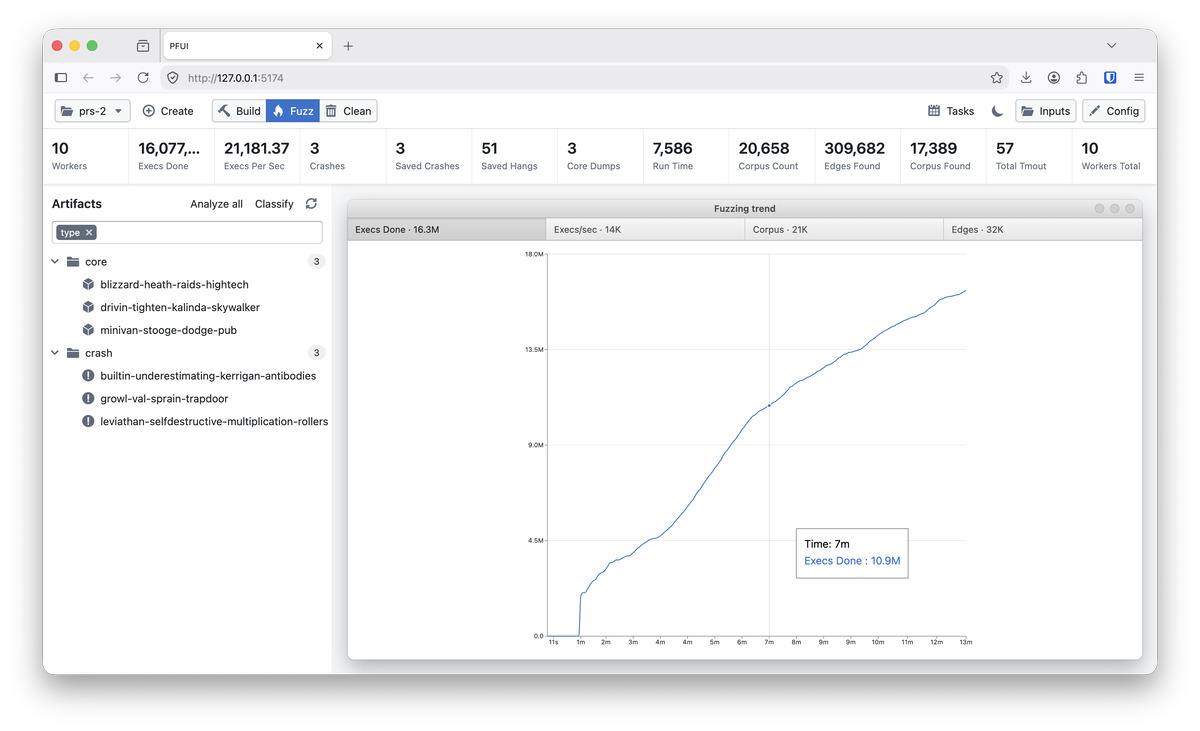
To help with this, I have a simple web UI that can run build/fuzz/clean runs, manages the artifacts, can trigger analysis, classify crashes using an LLM, and group/sort items.
Note, a program crash can generate an AFL crash report, OR a core dump, or both, depending on the nature of the crash. We collect all of these into one bucket called artifacts. Where possible, crashes and cores are linked by a step in the analysis.
Notifications
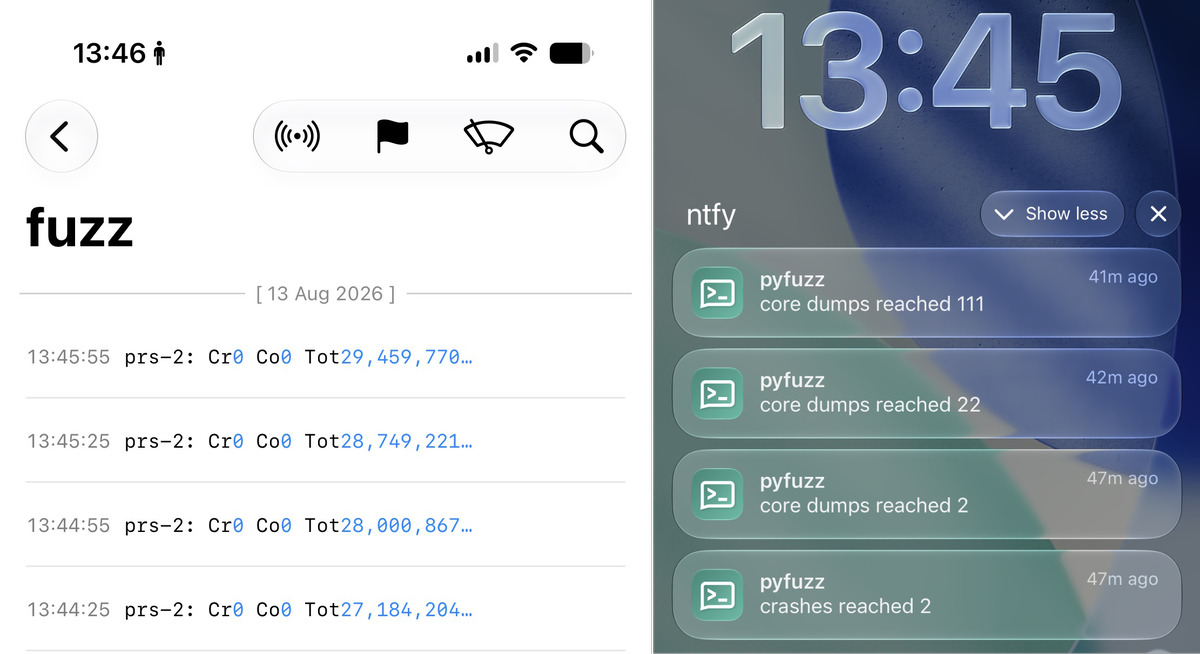
These fuzz runs can run for a long time, and I was impatient while tracking the progress. To help, I added two notification systems:
- A simple logging framework I was already running that receives JSON messages and can be traced from a phone/device. This is just used for the general status updates
- An ntfy active notification trigger when the crash/core count increases by an order of magnitude. This is the active trigger to tell me that something had been found.
AI Use
Code
The nice thing about pyfuzz is the product is the output. The code to get there is highly technical and reasonably complex, but it's all internal utility, rather than being a primary feature of the project. This meant that I was free to use AI as much as I wanted, and used it as an experimentation platform for AI automation of larger codebases.
The core tool code was fairly easy to get setup with the earlier code generation models, I had to do one or two refactors, including an early manual rewrite to get the core structure sorted out. After that, Codex was able to stick within the defined structure well enough to generally cope.
Over time, the models got better and better at flattening the 'technical debt' curve, so I could just rely on them more to get the code right without so much review.
UI
An area where the models really struggled was on the frontend. I got Codex to write a simple web frontend, but it reached a critical 'slop' mass quite quickly, was flaky and brittle, and became unmaintainable quickly.
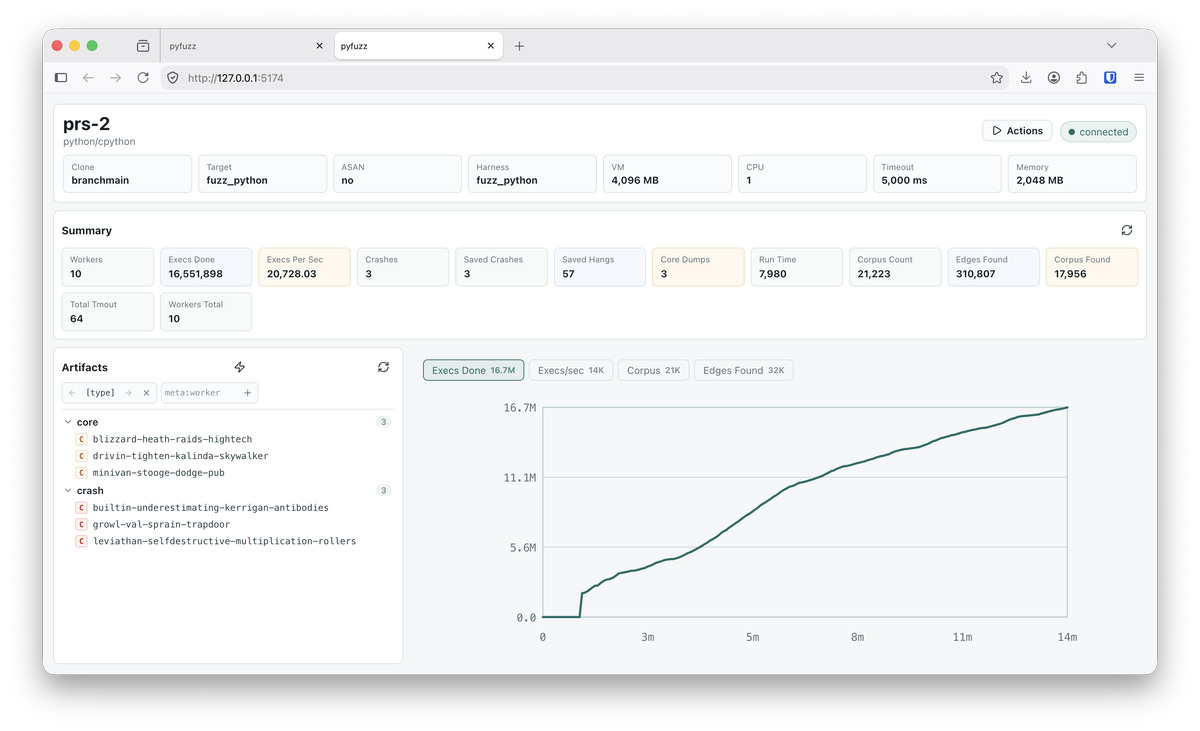
I went back to just using a CLI interface, and this was fine, but sometimes you'd get 1,000s of crashes, and sorting/managing them was a bit less easy than I'd hoped in the terminal.
Then came Fable, and I asked it to try again, with a fresh implementation, and everything just worked. It made sensible decisions, the architecture was sound (to the point where, I started noticing that when I asked for new features, the implementation was simple because Fable had already put in the right hooks/abstractions that naturally supported the new requests).
The pfui code is entirely Claude generated, I haven't even looked at it, and it works fine. I wouldn't sell this code, or rely on it for major decision making, but for the purposes of giving an overview over the fuzz process, it worked great.
Analysis
Going in, it was clear that dumping AI generated slop on the CPython maintainers would never be acceptable or responsible.
However, AI tools have their place in these workflows, and I took a very considered approach to automating my analysis.
Initially, I investigated each crash manually (the early crashes tended to be a bit simpler to track down), and as the complexity of the reproduction increased, I leaned more and more on ChatGPT to help with the somewhat poorly documented LLDB commands (things like setting breakpoints under complex conditions, or in dlopened functions etc.).
Over time, I just relied more and more on ChatGPT to help with the analysis, ending up copy-pasting LLDB commands/output between the terminal and the chat window. This was a useful learning phase for me, gaining familiarity with more advanced LLDB command usage.
At one point, I pasted a stack trace to ChatGPT, and it immediately pointed out that the last 4 bytes of one of the (many) pointers referenced near the top of the stack was actually a partial string value encoded as a hex number. This made me realise that I was probably the bottleneck in this analysis, and Codex could analyse the data more thoroughly and quickly than I reasonably could (I'm not a debugging novice either).
Inverting the workflow. By this time, I'd built up quite a suite of tools for analysing crashes. All I had to do was document the tooling available, outline the analysis goals, and then let Codex loose on a crash.
It took several iterations to get this right. Codex tended to stop after initial root cause analysis, and it took a lot of work to get it to actually chase down the exact line-by-line sequence of events needed.
Eventually, I included a set of previous fuzz-related issues I'd already created, and a detailed set of instructions for writing up the analysis, and this at least got Codex to do the work needed to let it produce that level of detailed writeup.
Despite this, no GitHub Issue I opened ever was a copy-paste from one of these writeups. Once I'd independently verified the analysis, and reproduced the issue, often running a bisect to check the commit that introduced it, I would then write it up in my own words, using the Codex source material as a reference. This let me verify each word of the issue, make sure it made sense, and avoid too much waffle/slop content.
This process is surprisingly hard, as the LLM is often so accurate/precise in its descriptions that it comes across as overly pedantic, including detail that isn't really important to the fix. But it's also not incorrect or irrelevant, so you need a fair amount of judgement to work out what the core narrative should be and prune the rest.
Outcome
CPython (29)
| Issue # | Title | Date |
|---|---|---|
| 156126 | debug abort importing module with lone surrogate when -X importtime=2 is set |
20 Aug |
| 156122 | Segfault/debug abort because _PyModule_GetFilenameUTF8 asserts module filenames must be utf-8 (called by crossinterp) |
20 Aug |
| 156121 | crossinterp: Segfault in check_missing___main___attr if AttributeError args are not normal |
20 Aug |
| 156118 | dtrace: debug abort importing module with lone surrogate unicode char in name while DTrace import probe is active | 20 Aug |
| 156117 | segfault caused by unchecked PyUnicode_AsUTF8 in _interpreters module |
20 Aug |
| 156114 | segfault/debug abort from perf_map_write_entry with lone surrogate in filename or qualname |
20 Aug |
| 156108 | Memory errors during parsing may trigger a debug abort | 20 Aug |
| 155782 | Segfault calling: SSLObject.group() before a session has been established | 14 Aug |
| 155733 | Segfault & Debug abort when functools.partial/operator.methodcaller keywords contains non-string keys | 13 Aug |
| 153419 | debug abort/ref leak calling __init__(<str>, <enc>) on a one-byte bytearray |
30 Jul |
| 149146 | Segfault when cleaning up after a MemoryError with deeply nested objects | 10 Jul |
| 153437 | Compiling code that mixes: deeply nested brackets and invalid escapes in f-strings causes debug assert/abort | 9 Jul |
| 153210 | Errors during array module import result in double-DECREF |
7 Jul |
| 153182 | Segfault from _PyDict_NewKeysForClass under memory pressure |
7 Jul |
| 152951 | Double DECREF from deque.extend() if block allocation fails in deque_append_lock_held |
6 Jul |
| 152954 | sqlite3 Connection and Cursor segfault if __init__ is bypassed (by subclass or __new__ call) |
3 Jul |
| 152817 | Segfault after deleting row_factory attr of sqlite3 cursor |
1 Jul |
| 152685 | Debug abort when calling <generator>.throw(StopIteration) on a generator that hasn't started yet |
30 Jun |
| 152635 | _interpchannels.create() debug aborts if channel lock allocation fails |
30 Jun |
| 151238 | Debug abort compiling f-string concatenation with broken imports | 11 Jun |
| 151112 | Double free corruption when allocation failures occur in assemble_init |
11 Jun |
| 151119 | Missing Py_SetStackPointer call in LIST_APPEND |
9 Jun |
| 150207 | Allocation failures generated in _PyTokenizer_FromUTF8 lead to SystemError/abort()s |
6 Jun |
| 150722 | Segfault from C stack overflow when under memory pressure | 1 Jun |
| 149449 | Deleting unicodedata from sys.modules can cause pointer use-after-free |
24 May |
| 149590 | Creating multiple instances of faulthandler module causes unbalanced refcount on fatal_error.file |
23 May |
| 149122 | Segfault with async generator expressions | 30 Apr |
| 146471 | Segfault from sqlite3 module when abusing threads | 26 Mar |
| 146169 | Segfault/UB from expat when re-entering the XML Parser | 19 Mar |
NumPy (1)
| PR # | Title | Date |
|---|---|---|
| #31996 | Return FAIL if PyArray_ClipmodeConverter is called with an invalid integer value | 15 Jul |
Pandas (1)
| Issue # | Title | Date |
|---|---|---|
| #66356 | Segfaults from various python api call return values not being checked during encode by ujson | 17 Jul |
OpenSSL (1)
| Issue # | Title | Date |
|---|---|---|
| #32379 | Segfault when calling SSL_get0_group_name() before handshake |
14 Aug |